



Dominican Republic E-Ticket 2026: Official Website & How to Fill It Out
Planning a trip to the Dominican Republic? If you're flying into or out of the country, you'll likely need to complete the Dominican Republic E-Ticket before your trip. The good news: the E-Ticket is free, takes about 5 minutes, and can be completed online. In this updated 2026 guide, we'll show you exactly where to get the Dominican Republic E-Ticket, how to fill it out, when to complete it, how the QR code works, and what families need to know.
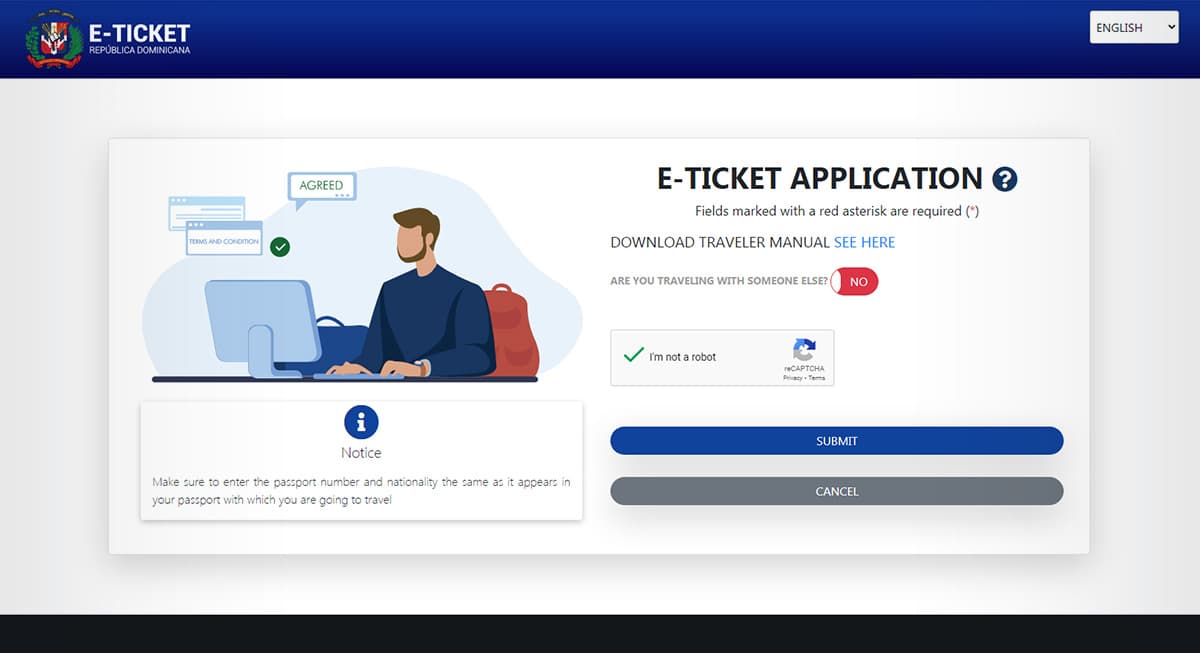
The E-Ticket Migración is the Dominican Republic's official electronic immigration and entry form. It is used by passengers traveling into and out of the country on commercial flights and is managed through the Dominican Republic's Dirección General de Migración (DGM). The official E-Ticket is free and should be completed through the government's official E-Ticket website: 👉 Official Dominican Republic E-Ticket Migration
You will need basic personal and flight information, including your passport number, airline, flight number, travel date, and accommodation details. Once the application is submitted, you receive a confirmation and QR code.
Important: The E-Ticket is FREE
You should never have to pay to complete the official Dominican Republic E-Ticket. Be careful when searching Google, as third-party websites may look official and charge a fee.
Already dreaming of more than just a vacation? Many of our clients first discovered Sosúa and Cabarete on a trip just like this one. If you find yourself falling for the North Coast while you're here, take a look at our current listings, or read our guide to buying property in Sosúa if you're curious what that could look like.
Is the Dominican Republic E-Ticket Mandatory in 2026?
Yes. According to the Dominican government's current information, foreign and Dominican passengers entering or leaving the Dominican Republic on commercial flights must complete the electronic E-Ticket form. There are exceptions for certain forms of transportation, including private flights and some non-commercial maritime travel. If you're flying commercially to the Dominican Republic for vacation, however, you should complete the E-Ticket before traveling.
When Should You Complete the E-Ticket?
You no longer need to wait until 72 hours before your flight. The Dominican Republic's official tourism website states that you can complete the E-Ticket as soon as you have your flight information — even months in advance. We recommend completing it before your travel day, so you won't have to deal with the form while standing at the airline counter.
Dominican Republic Entry Form and E-Ticket Migration
Completing the E-Ticket is relatively simple and usually takes around 5 minutes.
1. Go to the official E-Ticket website
Visit: 👉 Dominican Republic E-Ticket – Official Website. Make sure you're using the official .gob.do website.
2. Start the application
Accept the terms and begin entering your information. You'll need information such as full name, passport number, email address, flight number, airline, travel information, accommodation address, and customs information, when applicable.
3. Enter your personal information
Enter your details exactly as they appear on your passport. Double-check your passport number before submitting.
4. Enter your flight information
Have your flight details ready, including your airline, flight number, travel date, and arrival or departure information. If you're flying via Puerto Plata, check out our Puerto Plata Airport (POP) guide for transfer tips and distances to Sosúa and Cabarete.
5. Enter your accommodation
If you're staying at a hotel, enter the requested hotel information. If you're staying in an Airbnb or vacation rental, make sure you have the complete address, including the province, municipality and sector. If you're unsure, ask your host for the exact address.
6. Complete the Customs section
The E-Ticket also includes customs information. If you're traveling with family, children do not need to complete the Customs section; only adults do.
7. Review your information
Before submitting, carefully check your passport number, name, flight number, travel date, airport, and accommodation address. A small mistake can create unnecessary problems at the airport.
8. Submit the form
Once everything is correct, submit the E-Ticket. You will receive a confirmation and QR code.
9. Save your QR code
Take a screenshot of the QR code and keep it somewhere easily accessible on your phone. You can also print it as a backup.
Dominican Republic E-Ticket for Families
Traveling with your family? You don't have to create a completely separate user for every family member. One person can enter the information for the entire family group. The official tourism website currently allows up to 7 people per form — one person can complete their own information plus up to 6 additional family members. If your group contains more than 7 people, you'll need to complete an additional form. Children can be included in the family form and do not complete the Customs section; a single QR code is generated for the whole family.
What If My Flight Changes?
If your flight information changes after completing your E-Ticket, don't panic. The official Dominican Republic tourism website states that you can use the application code issued when you started the form to access the application and make changes. Always check your information again before traveling.
Do I Have to Print the E-Ticket?
No. You can save a screenshot of your QR code on your phone. However, we recommend keeping a screenshot available offline, rather than relying on airport Wi-Fi. You can also print the confirmation if you prefer.
Common Dominican Republic E-Ticket Mistakes
Before submitting your form, check these details carefully:
- ❌ Wrong passport number — your passport number is one of the most important pieces of information in the application
- ❌ Wrong flight number — make sure your flight information matches your actual trip
- ❌ Wrong airport — double-check whether you're arriving at Punta Cana (PUJ), Santo Domingo (SDQ), Puerto Plata (POP) or another Dominican airport. See our Puerto Plata Airport guide if you're flying into POP."
- ❌ Incorrect accommodation — if you're staying in an Airbnb or vacation rental, get the complete address from your host
- ❌ Waiting until the airport — don't leave the E-Ticket until the last minute; complete it beforehand and save the QR code
Dominican Republic E-Ticket Checklist
Before you leave for the airport:
- E-Ticket completed (entry and departure information)
- Passport number checked
- Flight number checked
- Accommodation address ready
- QR code saved on your phone
- Passport packed
Dominican Republic E-Ticket FAQ
What is the E-Ticket Migración in the Dominican Republic?
The E-Ticket Migración is the Dominican Republic's official electronic immigration and entry form, managed by the Dirección General de Migración (DGM). It's free and should be completed through the government's official website.
Is the E-Ticket mandatory?
Yes. Foreign and Dominican passengers entering or leaving on commercial flights must complete the electronic form.
Is the E-Ticket free?
Yes. The official Dominican Republic E-Ticket is completely free.
How long does the E-Ticket take?
The Dominican Directorate of Migration lists the processing time at approximately 5 minutes.
Do I need it for both arrival and departure?
Yes. The E-Ticket covers both entry and exit from the Dominican Republic.
Can I complete one form for my family?
Yes. One person can complete the form for up to 7 family members total.
Do children need to complete the Customs section?
No. Children do not complete the Customs section.
Do I need to print my QR code?
No. You can save a screenshot of the QR code on your phone. Printing it is optional.
What if I made a mistake?
Use the application code from your E-Ticket to access the application and make changes where permitted.
Do cruise passengers need an E-Ticket?
Certain non-commercial maritime travelers, including cruise passengers, are exempt from the electronic E-Ticket and use the applicable physical forms instead.
Ready for Your Trip to the Dominican Republic?
Once your E-Ticket is completed and your QR code is saved, you're one step closer to your Caribbean vacation. And if you're heading to the Dominican Republic's North Coast, don't be surprised if you fall in love with more than just the beaches. Take a look at our guide to the best beaches on the North Coast or our complete Sosúa real estate guide to see what first brings visitors here — and what makes many of them stay.
Enjoy your trip to the Dominican Republic — and don't forget your passport, boarding pass and E-Ticket. 🇩🇴🌴